Pedometer Android: How to Track Your Steps on Android Easily
Your Android already counts your steps. Here's how to check them in Health Connect, plus a fun way to make each one count.


If you carry an Android phone in your pocket most of the day, it's already counting your steps. No extra hardware, no watch, no setup screen to hunt down first. The motion sensors built into almost every Android phone quietly log your movement in the background, whether you're walking to the bus stop or just pacing the kitchen while the kettle boils.
Most people never go looking for that number until they're curious, or until an app asks for permission to read it. Here's where to actually find it, and what to do with it once you do.
How to check your steps on Android
On Android 14 and newer, the place to look is Health Connect. It's the hub that lets apps share health and fitness data with each other, and once you've given any step-tracking app permission to read your steps, Health Connect can start recording your phone's own step count automatically. Open Settings, then look under Security & privacy, then Privacy controls. If you can't find it there, just search "Health Connect" from the settings search bar. It's usually faster than tapping through menus.
Inside, tap Data and access, then Steps, and you'll see a running log of what your phone has picked up. Some phones and Android versions may still route this through Google Fit or the newer Google Health app instead, so if Health Connect comes up empty, check whether either of those is installed and has step data. There isn't one single screen every Android phone uses, which is honestly a little annoying, but the step count is in there somewhere.
Either way, no wearable required. The sensor doing the counting is already inside the phone in your pocket.
Steps & Beasts: tracked steps with a twist
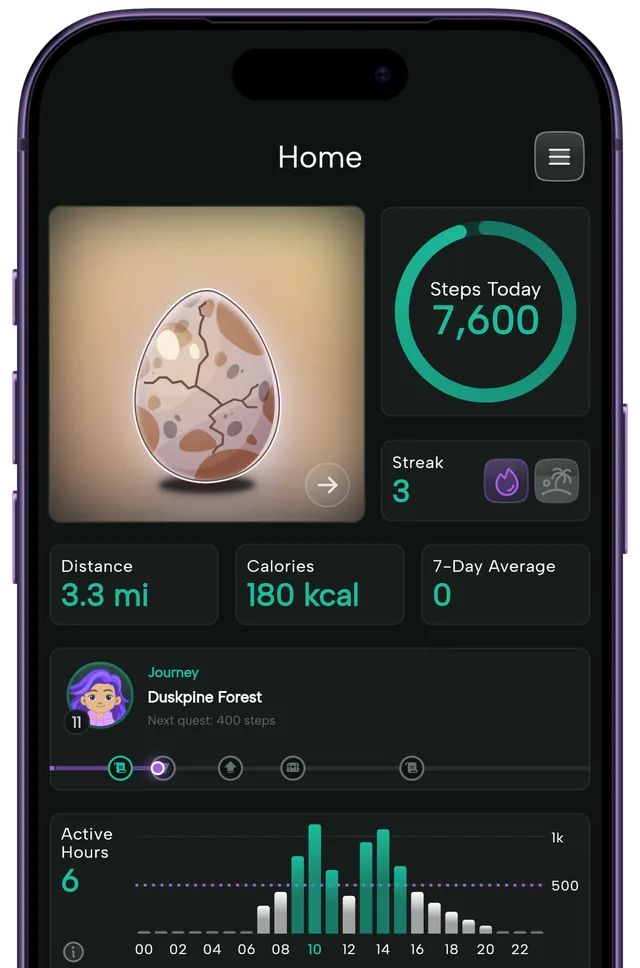
Health Connect will show you a number. Steps & Beasts does something with it. It's a free step tracker for iOS and Android with a small game built on top of your daily walk. Every morning you get a mysterious egg. Hit your step goal and the egg hatches into a collectible creature called a Beast.
There are 170+ Beasts to collect, weekly and monthly streaks to keep alive, and home screen widgets so you can check your progress without opening the app. No login, no ads.
I've caught myself doing an extra loop around the parking lot at 9:40pm because an egg was sitting at 90 percent and I didn't want to lose the streak. That's the part a plain step count doesn't do. A number on a screen doesn't ask anything of you. A half-hatched egg kind of does.
Why a dedicated step app is useful
Health Connect and Google Fit are good at storing data. They're not built to make you care about it. There's no goal staring back at you, no reason today's walk feels different from yesterday's.
A dedicated step app fixes that by giving you something to aim for and a streak worth protecting, which turns a number you'd otherwise ignore into a small daily decision. Start with your current average from Health Connect, set a goal a few hundred steps above it, and let the app do the nagging so you don't have to.
Steps & Beasts is free to download on iOS or Android. Pull up your Android step history tonight, pick a goal that's a stretch but not a stretch too far, and see if a hatching egg changes what you do in the last twenty minutes of your day.
A few quick questions
Do I need a smartwatch to count steps on Android? No. Your phone's built-in motion sensor counts steps on its own, whether or not you own a smartwatch or fitness band.
Why don't I see any steps in Health Connect? Usually because no app has been given permission to read them yet. Open a step-tracking app, grant it the steps permission when asked, and Health Connect should start filling in from there.
Does Steps & Beasts work without Google Fit? Yes. It reads your steps through Android's standard health data sources and works whether or not Google Fit happens to be installed on your phone.