Step Tracker iPhone: How to Track Your Steps and Stay Motivated
Looking for the best step tracker for iPhone? Learn how your iPhone tracks steps, how to view your progress, and which app makes walking more fun and rewarding.


Your iPhone has been tracking your steps since the iPhone 5s, using a dedicated motion coprocessor that runs in the background all day. You don't need to set anything up or carry a separate device.
How to view your steps in Apple Health
Open the Health app, tap Browse, select Activity, then Steps. You'll see daily, weekly, and monthly step counts. Tap any bar in the chart to see the exact count for that day.
You can also add the Steps widget to your home screen: press and hold the home screen, tap the + button, search for Health, and select the Steps widget. Your daily count shows up at a glance.
Why tracking matters
Knowing the number changes behavior. People who check their step count during the day walk more than those who don't. Having a goal, even just 500 more than your current average, gives the day a small finish line to cross.
Apple Health is good for data. If you want a reason to actually hit a goal, a step app with a reward loop makes a real difference.
Steps & Beasts: step tracking with something to collect
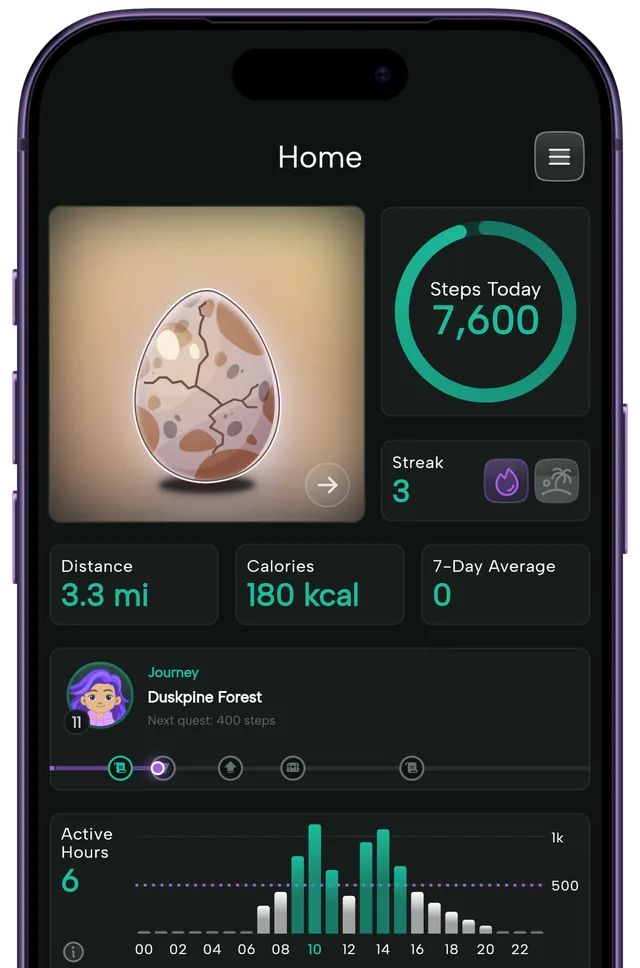
Steps & Beasts is a free app for iPhone and Android that reads your step data via Apple Health on iOS and adds a game on top. Set a daily goal, walk, and when you hit it, an egg hatches into a collectible Beast.
Over 170 creatures to find across months of consistent walking. Streak tracking shows you how many days in a row you've hit your goal. No account needed, no ads, all data stays on your device.
The difference between Apple Health and Steps & Beasts isn't what's counted. It's what you feel when you close the number. One shows you a graph. The other hatches a creature.
Download Steps & Beasts free on iOS or Android.